



Deploy on GCP GKE
Step-by-step guide for deploying Sligo Enterprise on Google GKE with Cloud SQL, in-cluster Redis Stack, and Cloud Storage.
Prerequisites
- Terraform >= 1.0
- kubectl
- gcloud CLI with
gcloud auth application-default login - Sligo credentials
- A GCP project with billing enabled
Step 1: Create Your Environment
git clone https://github.com/Sligo-AI/sligo-terraform.git
cd sligo-terraform

make create-environment-gcp
When prompted:
- Environment name: e.g.,
prod,dev,staging - GCP region: e.g.,
us-central1,europe-west1 - Cluster name: defaults to
sligo-{env-name} - Domain name: e.g.,
app.example.com - Client repository name: from Sligo
- App version: e.g.,
v1.0.0(pin for production)
This creates environments/gcp-gke-{env-name}/ with pre-filled config.
Step 2: Add Sligo Credentials
cd environments/gcp-gke-{your-env-name}

# Copy your Sligo service account key here
cp /path/to/sligo-service-account-key.json ./
Ensure terraform.tfvars has:
sligo_service_account_key_path = "./sligo-service-account-key.json"
Step 3: Configure terraform.tfvars
Edit terraform.tfvars with your values. Key variables:
| Variable | Description |
|---|---|
cluster_name |
GKE cluster name |
gcp_project_id |
Your GCP project ID |
gcp_region |
e.g., us-central1 |
domain_name |
Your app domain |
client_repository_name |
From Sligo |
app_version |
e.g., v1.0.0 |
db_password |
Database password |
jwt_secret, api_key, nextauth_secret, gateway_secret |
App secrets |
encryption_key |
64 hex chars: openssl rand -hex 32 |
Optional: db_tier (default db-f1-micro), redis_persistence_size (default 1Gi), redis_persistence_storage_class (default standard-rwo), use_existing_gcs_bucket.
Step 4: Deploy
terraform init
terraform plan
terraform apply
Deployment typically takes 15–25 minutes (GKE + Cloud SQL + in-cluster Redis Stack + GCS buckets).
Step 5: Post-Deploy — DNS
- Get the load balancer IP/hostname:
kubectl get ingress -n sligo - Create an A or CNAME record pointing your domain to the GCE load balancer.
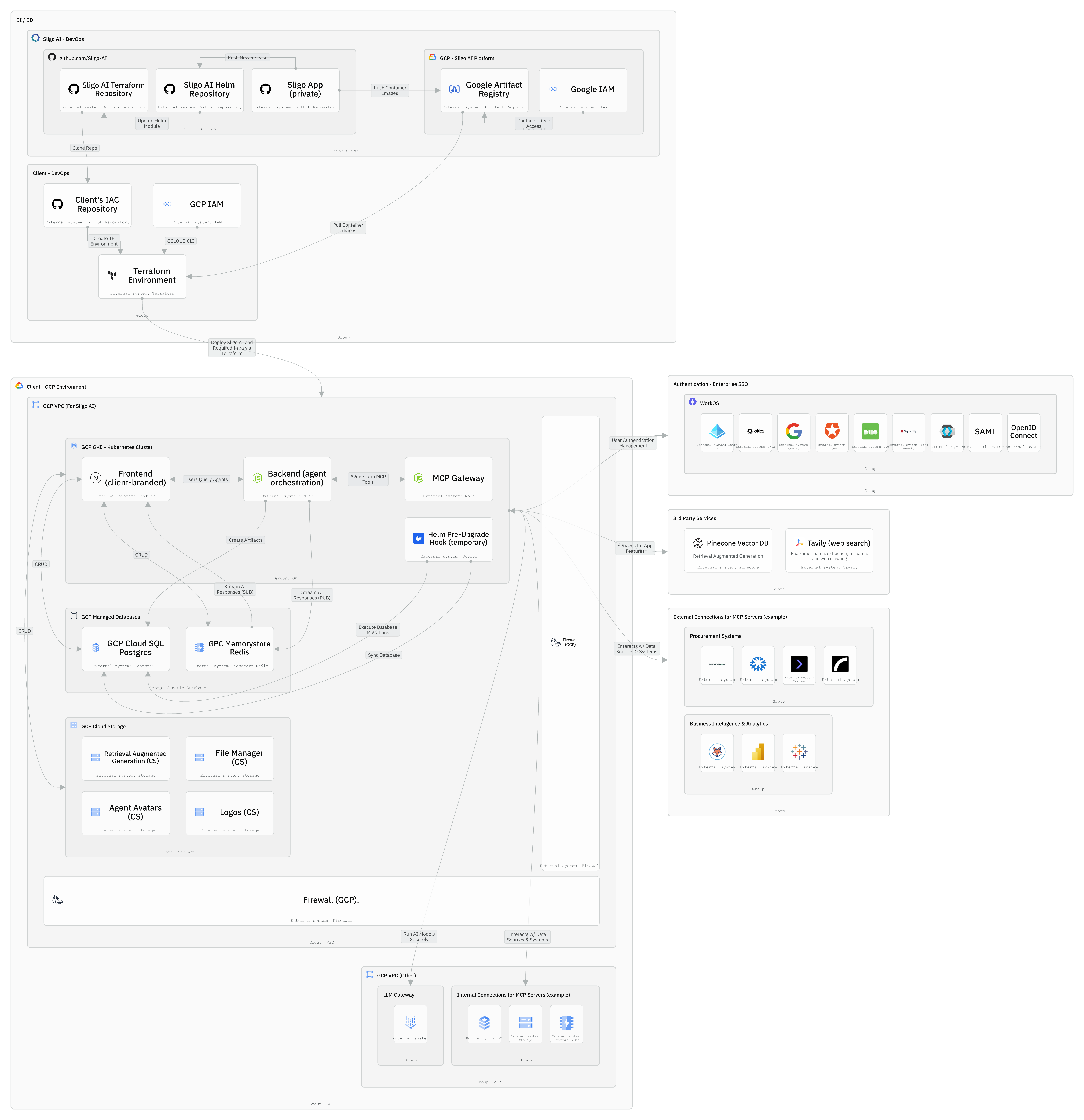
What Gets Created
- GKE cluster with node pool
- Cloud SQL (PostgreSQL)
- In-cluster Redis Stack (RedisJSON, persistent)
- 4 GCS buckets (file-manager, agent-avatars, logos, rag)
- GCE Ingress (HTTP(S) load balancer)
- Sligo Enterprise Helm chart deployment
Manual Setup (Without create-environment)
cd examples/gcp-gke
cp terraform.tfvars.example terraform.tfvars
# Edit terraform.tfvars (add gcp_project_id, secrets, etc.)
terraform init && terraform apply
| ← Back to overview | AWS → | Azure → |